


Which Blog Posts Actually Make Money?
Updated: Oct 3, 2025
If you’ve ever scrolled Pinterest and thought, “I’ll just copy what that big blogger is doing”, you’re not alone. So many people fall into that trap. They see accounts with millions of impressions and assume those posts must be rolling in sales.

But actually…. big numbers on Pinterest don’t always mean big blog traffic and impressions definitely don’t equal income. It was not until I stopped guessing and started looking into blog stats with keysearch and NeilPatel that it clicked for me that 80% of most blogs’ traffic comes from just a handful of posts.
If youre tired of guessing what to write about, I’m here to show you how to find the blog post ideas that actually bring in traffic and revenue not just the ones that rack up pretty Pinterest stats.
This blog shares tips on how to make money online based on my experience and years of research. Results will vary. There is no guarantee.
Step 1: How to See Which Posts Bring in Traffic
The first step is simple: find out which posts are driving the traffic to a competitor’s blog instead of guessing based on their pins and impressions.
How to do it:
In KeySearch, select “Explorer” under “Competitive analysis”
Then enter your competitor’s domain.
Click on the Top Pages section.
You’ll see exactly which posts are bringing in the most traffic.
This is where the surprises happen. You might think their pretty recipe pin is paying the bills—but maybe it’s their “Best Blender for Smoothies” review that’s actually ranking and converting. KeySearch makes that difference clear in seconds.
Step 2: How to Spot Gaps in Your Competitors’ Content
Once you know which posts are driving traffic for other blogs, the next step is to look for gaps, in other words topics they rank for that you don’t. This is where new opportunities show up.
How to do it:
In KeySearch, Use the Competitor Gap feature.
Enter your own blog URL.
Enter the URL of 1-2 competitors in your niche and compare
KeySearch will highlight keywords and posts your competitors rank for but you don’t. Those are golden opportunities because if their blog can rank for it, yours probably can too.
This is how you stop chasing ran
dom post ideas and start building content that fills real gaps in your niche.
Step 3: Evergreen vs. Buyer Posts — Finding the Balance
Not every blog post is meant to make money right away. Some posts are there to bring in steady traffic over time (evergreen), while others are designed to catch people who are ready to buy (buyer intent). You need both.
Evergreen posts
Usually answer a common question.
Keep bringing in traffic month after month.
Example: “How to Start a Blog in 2025” or “Morning Routines for Working Moms.”
Buyer posts
Usually compare or recommend products.
Target people ready to spend money.
Example: “Best Laptops for College Students” or “Top 5 Planners That Actually Sell on Etsy.”
How to balance them
It all depends on your goals and the time of the year.
As a general rule, for every 1 buyer post I write, I write 3 evergreen posts
During Q4 - the biggest spending time of the year, I write more buyer posts than evergreen posts.
Evergreen posts build steady traffic and authority. Buyer posts make sure that traffic converts into sales.
Think of evergreen posts as the engine that keeps your blog moving, and buyer posts as the fuel that pays for the ride.
Step 4: Using KeySearch to Guide Your Blog and Pinterest Strategy
What i love about Keysearch is the feature that allows you see what people are searching for directly on Pinterest or Google. That alone saved me months of trial and error.
Every keyword you look up also comes with a little trend graph that shows you exactly when people start searching for the keyword. For example, the keyword “Christmas nails” . It always spikes in December.
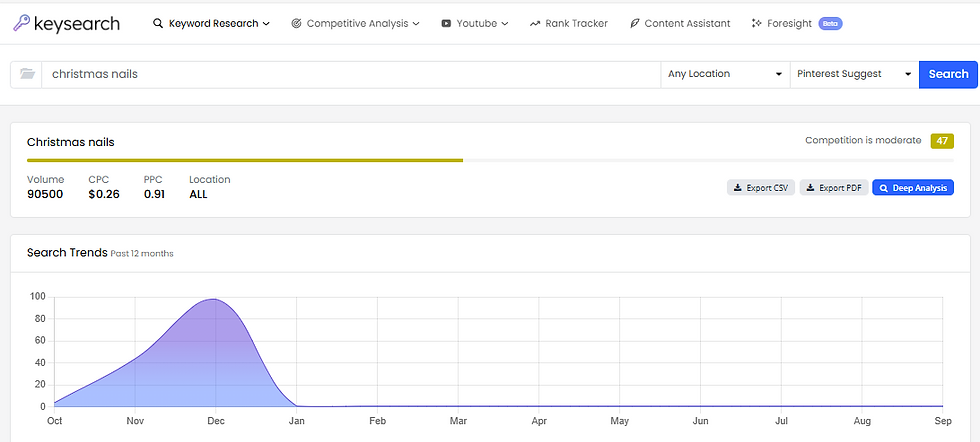
If you wait until then to write about it, you’re too late. I’ve learned to get those posts out in September or October so they’re ranking before the peak.
It’s like having a traffic forecast for your blog. You know what’s coming, and you can plan ahead.
Here’s how I use it step by step:
I start with Keyword Research to find topics that match my niche.
I check the Keyword Difficulty (KD) score so I don’t waste time on keywords I can’t win.
I look at the SERP Analysis—if smaller sites are ranking, that’s my green light.
I pull in terms from Content Assistant to make my post more complete and easier to rank.
And when I want Pinterest traffic, I just switch the dropdown from Google to Pinterest and see what’s trending there.
Once you see the data laid out, blogging feels a lot less like gambling and a lot more like strategy
Step 5: Your Action Plan for Profitable Posts
Now it’s over to you to put everything together into a simple plan you can follow for every new blog post.
Your 5-step action plan:
Find a topic with KeySearch – Check search volume, competition, and trends.
Check competitors – See which posts are driving their traffic and spot the gaps you can fill.
Decide the angle – Is this post evergreen (traffic) or buyer intent (sales)? Keep your 3/1 mix in mind depending on the time of the year.
Create the post fast with AI automation – the goal is to create momentum, not stall
Promote it – Turn it into pins with Ideogram or Canva, and schedule with Tailwind for steady traffic.
This workflow keeps you focused on posts that actually have the potential to rank, attract readers, and generate income.
Final Thoughts
Not every blog post is going to make money—and that’s okay. The key is knowing which ones will bring in traffic, which ones will bring in sales, and how to balance the two.
Instead of copying what you see on Pinterest or guessing which posts might work, KeySearch gives you the data to make smarter choices. You can see which posts are driving traffic for competitors, spot the gaps in your niche, check what people are searching on Pinterest, and even plan content ahead of seasonal spikes.
When you use it as your guide, blogging becomes less of a gamble and more of a strategy. You’ll spend less time writing posts that don’t move the needle, and more time creating content that has the potential to rank, attract the right audience, and actually pay.
So the next time you sit down to plan content, don’t just follow trends—open KeySearch and build a plan around what really works.



Comments