


How to Make Stickers that sell like Crazy (Beginner-friendly guide)
Updated: Dec 31, 2025
If you’re looking to start a sticker business this year, this is the best beginner friendly guide you’ll ever need.
This guide walks you through the exact workflow to start making and selling stickers quickly, confidently, and without overthinking it… even if you’re brand new.
What types of stickers sell best
Let’s begin with what to sell.
There are several types of stickers you can sell, but the most popular and beginner-friendly sticker design styles that show up again and again in top listings are:
Positive Affirmations & Motivational Quotes.
Scrapbook-Style stickers
Laptop / Water Bottle Decals
Seasonal themed clipart stickers
Here are some examples on Etsy.
If you’re ever unsure what to create, the fastest way to get clarity is to search Amazon, Etsy, and Pinterest and look at what keeps appearing at the top. That quick snapshot of what’s already selling should guide your design choices.
What Kind of Sticker business model should you run? (3 Beginner Options)
Before you design anything, you need to decide what type of sticker business you’re running because there are three main routes and choosing the right one early saves you a LOT of frustration.
01.Digital Stickers (Best for Beginners)
With digital stickers, you arrange your stickers on sheets customers download and use in apps like GoodNotes, Notability, or Canva.
Pros
No printing, shipping, or inventory
Instant delivery
High profit margins
Easy to test ideas quickly
Perfect if you’re short on time
The main downside is that customers need to understand how to use digital stickers, so your listing needs clear instructions. Even with that small learning curve, this is still the best option for beginners. It’s low risk, fast to launch, and lets you focus on creating and selling, not logistics.
02.Physical Stickers (You Print & Ship Yourself)
These are traditional vinyl or paper stickers you print, cut, package, and ship.
Pros
Feels more “premium” and tangible
Great for gifts and aesthetics
Higher perceived value
However, this model is much more time-consuming. Printing costs, packaging, shipping issues, storage space, and the learning curve of cutting stickers correctly can all add up quickly. While it can be fun, it’s not ideal if you’re testing your first product or working with limited time.
03.Print-on-Demand Physical Stickers
With print-on-demand, you design the sticker yourself, but a third-party company prints and ships it for you. This removes the stress of inventory and shipping and makes scaling easier.
The trade-off is lower profit margins, less control over quality, and slower delivery times. This model makes the most sense once you’ve already validated your designs digitally and want to expand into physical products without handling everything yourself.
How to Create the Stickers (3 Proven Methods)
When it comes to creating your stickers, the goal is to start quickly, not to learn a brand-new skill from scratch. Choose a method that fits what you can already do.
Option 1: Draw them yourself with procreate. This is great if you already enjoy drawing. Very creative, but takes more time.
Option 2: Use PLR sticker packs.Quick and easy. Buy ready made stickers with a license to resell. Just edit them, add your own style and sell.
Option 3: Use AI. The fastest option and by far my favorite. I’ve used ChatGPT and Canva AI to create multiple sticker packs. Midjourney and Ideogram ai are also good options. You don’t need any art skills, just smart prompts that give fast results.
Important Advice when using AI (From Experience)
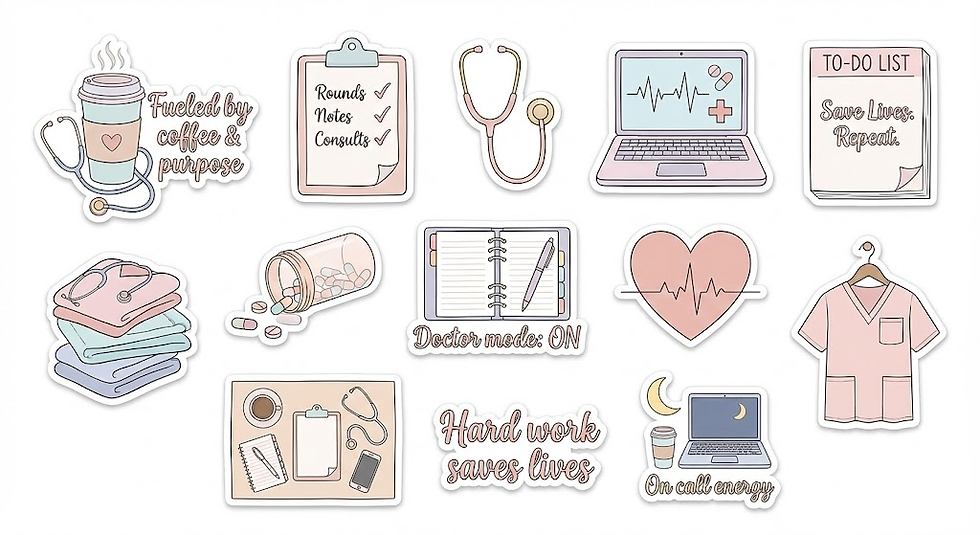
When prompts are too simple, AI will freestyle and the output may not be great. Overly detailed prompts on the other hand can also confuse AI and create messy results. So you need to find a balance. Here is an example of sticker packs I created with a detailed prompt versus a simple prompt.
Same Idea, different vibes.

How to Make Your Stickers Sell
Designing is only half the job. Selling is where most people get dissapointed and give up.
01. Validate demand
The first and most important step is validating demand.
Search Etsy for your idea
Look at bestsellers
Note themes, colours, wording, pack sizes
Validating demand should be one of the first things you do with your time before you start this or any other business.
02. Use Aesthetic, Scroll-Stopping Visuals (Not Basic Mockups)
For stickers, traditional mockups don’t always convert and that’s because sticker buyers are buying vibes, not functionality.

What works better are aesthetic, layered images that show lots of stickers together, overlapping, colourful, and playful. Think collage-style layouts, sticker dumps, or flat lays where the stickers feel abundant and fun. These visuals instantly communicate value and trigger that “I want this pack” feeling.
When someone sees a full, cohesive collection like this, they’re not analysing how it works, they’re imagining owning it.
That doesn’t mean mockups are useless, but for stickers they work best as supporting images, not the main one.
03. Promote, Promote, Promote on Pinterest (Long-Term Traffic)
If you choose to sell your stickers on Etsy, you get built in traffic. However, the competition is fierce, so you need to find a way to get eyes on your stickers. Pinterest is especially powerful for aesthetic products like stickers. By creating and scheduling 3-5 pins a day that link directly to your product, you can drive traffic for months without logging in daily.
How Much Does It Cost to Make Stickers? (Realistic Breakdown)
One of the biggest reasons stickers are such a popular beginner product is simple: they’re cheap to start — as long as you choose the right route.
Your costs depend almost entirely on whether you sell digital or physical stickers.
Digital Stickers: £0–£25 to Start
If you sell digital stickers, startup costs can be almost nothing. You’ll usually only need a design tool (like Canva, Procreate, or AI tools), optional mockups, and a small listing fee if you’re selling on Etsy. There’s no printing, no shipping, and no packaging mistakes eating into your profit.
Why this works: low costs let you test ideas quickly. If a sticker pack doesn’t sell, you pivot — not panic.
Physical Stickers (DIY): £80–£250+
Printing physical stickers yourself is where costs rise fast. Between printers, ink, sticker paper or vinyl, packaging, and shipping supplies, you’re paying upfront before you know what will sell.
Why this is risky for beginners: you’re investing money before demand is proven.
Print-on-Demand Stickers: £0 Upfront, Lower Margins
With print-on-demand, you only pay once a sale is made, but your profit per sticker is smaller and you have less control over quality and delivery times.
Why people still choose it: it’s hands-off and scalable once you’ve validated a design.
Beginner verdict: digital stickers win — lowest cost, lowest stress, and fastest feedback.
How Much Should You Sell Stickers For?
Pricing doesn’t need to be complicated. Sticker buyers expect affordable, impulse-friendly prices. Simply check the price of your competitor and keep your prices in a similar range.
Dont make the common mistake of pricing too low because buyers may associate your lower prices with worse quality and design.
Final thoughts
Sticker Business: Quick Takeaways
The sticker industry is booming because stickers are affordable, giftable, and impulse-friendly
Stickers are one of the easiest creative side hustles to start with little to no upfront cost
You don’t need to be an artist: AI, PLR, and simple design tools are enough to get started
What Works Best for Beginners
Digital stickers are the best place to start
Lowest startup cost
No printing, shipping, or inventory
Fastest way to test if your idea will sell
Physical stickers are best after you’ve validated demand digitally
Print-on-demand works well for scaling, but has lower profit margins
To Create Stickers Without Overwhelm
Use tools you already have access to (Canva, AI, Procreate)
If using AI, keep prompts simple because clarity beats complexity
Start with one sticker pack, not multiple designs
Always check commercial-use licenses if using PLR assets


Comments