


How to make seamless patterns with AI and Canva.
If you've been wanting to create beautiful seamless patterns for Etsy, print-on-demand, fabric, wallpaper, or digital products, this is probably the easiest way to start.
Using just Midjourney and Canva, you can create professional-looking repeating patterns in minutes — even if you have zero illustration experience.
In this tutorial, I’ll show you exactly how I create seamless patterns step-by-step, how to turn them into high-quality files, and even how to package them so they actually look sellable online.

What Are Seamless Patterns?
Seamless patterns are repeating designs that connect perfectly at the edges, so the pattern can continue endlessly without visible lines or gaps.
You’ve probably seen them on:
Fabric
Wallpaper
Wrapping paper
Children’s bedding
Sticker sheets
Party supplies
Phone cases
Digital scrapbook paper
Planner covers
Tote bags
Book covers
Packaging
Printable backgrounds
Print-on-demand products
And honestly, Etsy is full of them.
People are selling everything from coquette bow patterns and strawberry prints to gingham, French toile, western cowboy prints, baby patterns, florals, sports themes, and seasonal collections.
Once you learn how to make them, it becomes very easy to create entire bundles around one theme.
The Two Tools You Need
This process is honestly very simple.
You only need:
Midjourney → To generate the seamless tile
Canva→ To turn the tile into a high-resolution repeating pattern
That’s it.
Step 1: Create the Seamless Tile in Midjourney
The first thing you need is your pattern tile.
This is the square image that will repeat over and over again to create the final seamless pattern.
The Most Important Part: Use the --tile Parameter
Inside Midjourney, you MUST include:
--tile
This tells Midjourney to generate an image designed specifically for seamless repetition.
Without it, the edges usually won’t connect properly.
Example Prompt: Construction Truck Pattern
seamless pattern for children featuring construction vehicles dump trucks and cranes operating in mountainous work zone landscape --tile

What Happens Next?
Once Midjourney generates the image:
Choose your favourite version
Upscale it
Download it
That downloaded image becomes your seamless tile. You may need several tries to get the design you like.
Step 2: Create the Full Pattern in Canva
Now it’s time to turn your tile into a proper high-resolution repeating pattern.
Start by creating a Large Canvas
Inside Canva:
Click “Create Design”
Choose “Custom Size”
Set the dimensions to:
4000 x 4000 pixels
This is important because smaller files can become blurry when printed.
A larger canvas gives you a cleaner, more professional result for:
Fabric
Wallpaper
Digital paper
POD products
Printable downloads
Then use the “tile to pattern” app in Canva
Inside Canva:
Go to “Apps”
Search for:
Tiles to Pattern
Open the app
Upload your seamless tile
The app will instantly generate the repeating pattern for you.
And honestly, this is the really satisfying part because you immediately see the pattern repeating perfectly.

Final step: Adjust the pattern
Inside the app, you can adjust:
Zoom
Spacing
Density
Scale
This helps you customise how the final pattern looks.
For example:
Wallpaper patterns often look better more spaced out
Fabric prints sometimes need tighter repeats
Background patterns usually look cleaner with medium spacing
Play around with the settings until it feels balanced.
And that’s honestly it.
You’ve now created a seamless repeating pattern using AI and Canva.
Pattern Ideas That Sell Well on Etsy
Here are some themes that are doing really well right now:
Kids & Baby Themes
Dinosaurs
Trucks
Teddy bears
Safari animals
Bows
Farm animals
Space themes
Baby ducks
Feminine & Coquette Themes
Cherries
Pink bows
Balletcore
Vintage florals
Ribbon prints
Lace-inspired patterns
Home Decor Themes
Gingham
French toile
Japandi neutrals
Coastal shells
Cottagecore florals
Checkerboard patterns
Seasonal Themes
Christmas gingerbread
Valentine hearts
Halloween ghosts
Autumn pumpkins
Summer lemons
How to Package Your Seamless Patterns So They Look More Professional
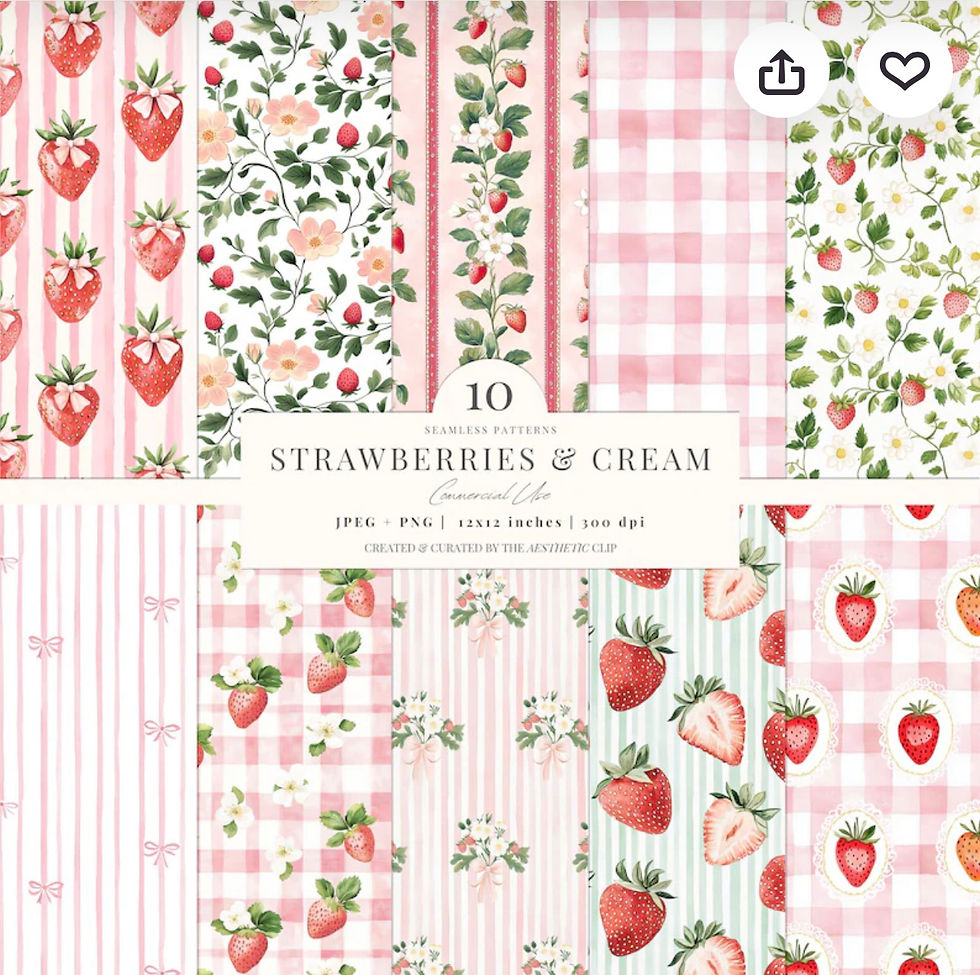
Once you’ve created your seamless patterns, the next step is presentation.
Even a beautiful pattern can look unfinished if it’s uploaded as a plain flat image. Packaging helps people actually visualise how the design could be used.
For example, you can show your patterns onFabric mockups, Wallpaper mockups, Notebook covers, tote bags,Gift wraps, Planner covers.
This will make your designs feel much more polished and professional, especially if you plan to sell them on Etsy.
You can either:
create your own mockups in Canva
use Canva smart mockups
or purchase affordable mockup templates from Etsy creators
Honestly, if you’re just starting out, I would recommend keeping things simple first by purchasing affordable templates. Your immediate focus should be on creating beautiful patterns and testing which styles people actually respond to.
Then later, if your patterns start gaining traction, you can always invest more time creating your own branded mockups and listing templates.
That approach keeps the process fun, low-pressure, and much more manageable.
Final thoughts on making seamless patterns
Learning how to make seamless patterns is honestly much easier than it looks once you understand the process. With tools like Midjourney and Canva, you can create beautiful repeating patterns without needing advanced design skills or expensive software.
The main thing is simply to start experimenting. Try different themes, test different prompts, and have fun with the process. The more patterns you create, the more confident and creative you naturally become.


Comments